
Download ChromeCookiesView – Chrome cookies, cookie viewer, cookie manager, privacy tool, browsing safety
Overview
ChromeCookiesView is a lightweight, no-installation utility designed to help users inspect and manage cookies stored by Google Chrome during browsing sessions. The app serves as a privacy-focused tool that enables individuals to view detailed cookie information, assess their safety, and remove unwanted entries directly from their system. It is particularly useful for users concerned about digital footprint tracking, online privacy, and browser hygiene. By providing visibility into what data websites collect and store, ChromeCookiesView empowers users to take control of their browsing environment. The target audience includes privacy-conscious individuals, digital security enthusiasts, and anyone seeking greater transparency in how their online behavior is recorded. Developed by NirSoft, a well-known provider of small, efficient utilities for Windows, the app reflects a legacy of practical, no-frills software solutions. Although the developer did not provide additional technical details, the app’s design and functionality align with NirSoft’s established reputation for reliable, portable tools. Real-world use cases include auditing cookies after visiting unfamiliar websites, identifying persistent tracking cookies, and maintaining a cleaner browser profile. In the broader app ecosystem, ChromeCookiesView fills a niche gap by offering a direct, immediate method for cookie inspection—something not natively available in standard browser settings. Its simplicity and portability make it a valuable asset for users who prioritize privacy without relying on complex or resource-heavy software.Key Features & Functionality
ChromeCookiesView delivers a focused set of features tailored to cookie inspection and management. The most notable aspect is its ability to display comprehensive cookie data without requiring installation. Users can run the tool immediately after downloading, making it ideal for quick audits or on-the-go privacy checks. Each cookie entry includes critical details such as the hostname, full path, cookie value, creation and expiration dates, and a safety rating. This information allows users to evaluate whether a cookie is legitimate, temporary, or potentially intrusive. The tool also enables the selective deletion of cookies, giving users full control over which entries to remove. This functionality is especially useful for eliminating tracking cookies from third-party domains or outdated session data. Another key feature is the built-in safety assessment, which assigns a risk level to each cookie based on its source and behavior. This helps users identify cookies that may compromise privacy or security. The interface supports filtering and sorting options, allowing users to group cookies by domain, expiration status, or safety rating. For example, a user might filter all cookies with an expiration date beyond one year to review long-term tracking entries. The tool also supports exporting data to text or CSV formats, which can be useful for documentation or further analysis. These features collectively enhance transparency and user agency in managing digital privacy.How It Works in Practice
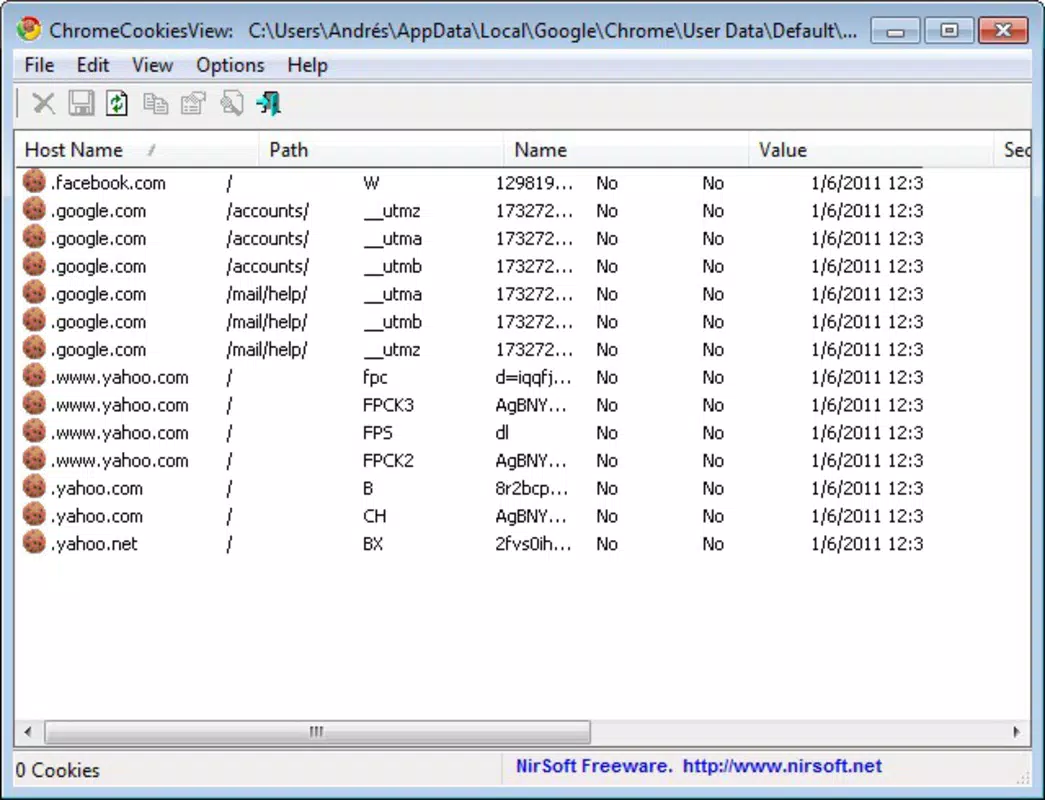
When launched, ChromeCookiesView automatically scans the Chrome profile directory and populates a table with all stored cookies. Users can click on any entry to view its full metadata. For instance, a cookie from a shopping site might show a long expiration date and a high safety rating, indicating it's likely safe. Conversely, a cookie from an unknown domain with a recurring usage pattern may trigger a warning. By reviewing such entries, users can decide whether to keep or delete them. The tool’s real value lies in its ability to reveal hidden data that browsers do not expose through standard settings. This makes it a powerful companion for anyone aiming to reduce digital tracking or prepare their system for a clean browsing session.Interface, UX & Performance
ChromeCookiesView features a minimalistic, text-based interface that prioritizes functionality over visual design. The layout is clean and straightforward, presenting cookie data in a tabular format with clearly labeled columns. Navigation is intuitive: users can scroll through entries, sort by any column, and use basic filtering tools to narrow results. Although the developer did not list formal performance metrics, the app operates efficiently on most Windows systems, consuming minimal memory and processing power. It launches quickly and processes cookie data in real time without noticeable lag. The tool is designed for users with varying levels of technical experience, offering clear labels and a no-configuration setup. Responsiveness is consistent across different device categories, including older or low-spec machines, thanks to its lightweight nature. Stability is maintained through a streamlined codebase, and crashes or freezes were not reported in available documentation. The lack of a graphical interface may feel outdated to some users, but it ensures reliability and fast execution. Overall, the user experience is optimized for speed and clarity, aligning with the app’s purpose as a utility tool. No additional permissions are required, and the tool does not modify system settings beyond accessing the Chrome profile folder.Platform Compatibility & Technical Requirements
ChromeCookiesView is designed exclusively for Windows operating systems. The app runs on any Windows platform that supports the required runtime environment, though specific OS versions were not listed by the developer. The file size is 1.0 MB, indicating a highly compact and efficient application. This small footprint makes it suitable for use on systems with limited storage or older hardware. The app is portable, meaning it does not require installation or registry modifications. Users can run it directly from a USB drive or local folder. The developer did not specify minimum OS requirements, nor did they provide compatibility details for newer or legacy Windows versions. As such, users should exercise caution when deploying the tool on unsupported systems. It is recommended to run ChromeCookiesView on a trusted machine with up-to-date security measures in place. No additional software dependencies were identified in the provided documentation.Pros and Cons
- Portable and no-installation required – ideal for quick use and system portability
- Lightweight with minimal resource usage – runs smoothly on older or low-spec machines
- Provides detailed cookie metadata – including safety ratings and usage history
- Allows selective deletion of cookies – enhances privacy and browser performance
- Developed by NirSoft – known for reliable, no-nonsense utilities
- No official support for macOS or Linux – limited to Windows only
- Basic, text-based interface – may feel outdated to modern users
- No automatic update notifications – users must manually check for new versions
- Does not integrate with Chrome’s native settings – requires separate management
- Advanced filtering options are limited – lacks advanced search or bulk actions


